Chatbot Interaction Design helps businesses create conversational experiences that are easy to understand, navigate, and use. By combining conversational UI design, intuitive dialogue patterns, natural language processing, and personalized responses, businesses can make chatbots more helpful and accessible. A well-designed chatbot guides users toward relevant answers, handles unexpected questions gracefully, and continuously improves through usability testing and performance analysis.
Chatbot Interaction Design focuses on creating clear, intuitive, and engaging conversations between users and automated systems. It combines conversational language, thoughtful interface design, logical conversation flows, and personalized responses to help users complete tasks without unnecessary confusion. Effective chatbot design makes digital interactions feel more natural, reduces user frustration, and helps businesses deliver faster, more consistent support across their digital channels.
Understanding Chatbot Interaction Design
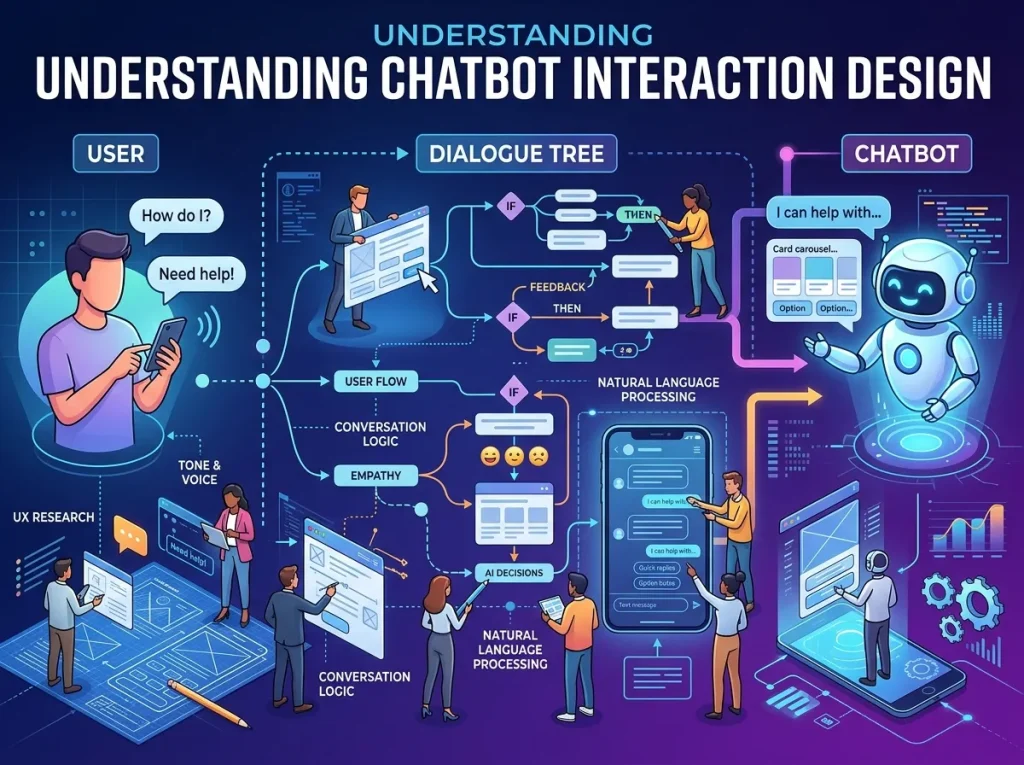
Chatbots have become an important part of digital communication, helping businesses answer questions, recommend products, collect information, and guide customers through different tasks. However, simply adding a chat window to a website does not guarantee a positive user experience. The quality of the interaction determines whether users find the chatbot helpful or frustrating.
Chatbot Interaction Design focuses on how people communicate with a chatbot, how the system responds, and how the conversation progresses toward a useful outcome. It considers the user’s goals, the information required at each stage, the language used in responses, and the available options when a conversation does not go as expected.
For example, a customer visiting an online store may ask whether a particular product is available in a specific size. A well-designed chatbot should understand the request, provide relevant information, and offer a useful next step. If the product is unavailable, it might suggest checking another size or contacting a support representative.
A poorly designed chatbot might respond with unrelated information, repeat the same question, or force the customer through several unnecessary steps.
These differences highlight why interaction design is essential. A successful chatbot does more than generate responses. It helps users accomplish their objectives through a conversation that feels understandable, relevant, and consistent.
Conversational UI Design and the Chatbot Interface
Conversational UI Design determines how users communicate with a chatbot through text, buttons, suggested replies, menus, voice input, or other interface elements. The interface should make the next action clear without overwhelming users with unnecessary choices.
A clean chatbot interface usually includes a recognizable message area, readable text, visible input controls, and clear indicators showing which messages come from the user and which come from the chatbot. Helpful prompts can introduce the chatbot’s capabilities and give visitors a starting point when they do not know what to ask.
For example, a customer service chatbot might display options such as checking an order, understanding a return policy, or contacting support. These choices reduce the effort required to begin a conversation while allowing users to type their own questions when appropriate.
The design should also work across desktop computers, tablets, and mobile devices. Text must remain readable, buttons should be easy to select, and important information should not disappear behind the virtual keyboard or other interface elements.
Accessibility deserves equal attention. Clear language, adequate contrast, keyboard navigation, and compatibility with assistive technologies can make chatbot interactions more inclusive.
A strong interface supports the conversation rather than distracting from it. Every visual element should help users understand their options, recognize the chatbot’s responses, or complete their intended task.
Improving Chatbot User Experience
Chatbot User Experience describes how people feel about and interact with a chatbot throughout the conversation. A positive experience depends on more than response speed. Users also need accurate information, understandable instructions, consistent behavior, and a clear path toward resolution.
One of the most important principles is reducing unnecessary effort. If a chatbot can retrieve information from an existing order record, it should avoid asking the customer to provide the same details repeatedly. Similarly, simple questions should not require users to navigate a long sequence of menus.
The chatbot should also communicate its capabilities honestly. If it can answer questions about shipping but cannot modify an order, it should explain that limitation rather than imply that every request can be completed automatically.
Tone plays an important role as well. A professional chatbot can still sound approachable by using natural language, concise explanations, and respectful responses. Excessive enthusiasm, repetitive greetings, or overly formal wording can make the interaction feel artificial.
When a request is unclear, the chatbot should ask a focused clarification question. If it cannot resolve the problem, it should provide an appropriate alternative, such as transferring the conversation to a human representative.
A useful chatbot experience respects the user’s time, keeps the conversation focused, and makes it easy to recover from mistakes. These qualities encourage trust and make users more willing to engage with automated support when they need it.
Designing an Effective Chatbot Conversation Flow
Chatbot Conversation Flow describes the sequence of messages, decisions, questions, and actions that move a conversation toward its intended result. A clear flow helps users understand what happens next while giving the chatbot a reliable structure for handling common requests.
The design process begins with identifying the main tasks users want to complete. These might include finding a product, booking an appointment, requesting technical support, or learning about a service. Each task should have a logical path that avoids unnecessary questions and explains important decisions.
Consider a chatbot designed to help customers track deliveries. It might first ask for an order number or allow the customer to retrieve an order through an authenticated account. After locating the order, the chatbot provides the current delivery status and explains any relevant delays.
If the order cannot be found, the system should not repeat the same unsuccessful action indefinitely. It could check whether the information was entered correctly or direct the user to another support channel.
Conversation flows should also account for interruptions. Users may change their minds, ask a related question, or provide information in a different order than expected. A flexible design allows them to correct an answer, return to a previous step, or switch to another task when possible.
Mapping these situations before implementation helps identify confusing transitions and missing responses. The result is a chatbot that feels more organized without forcing every conversation into a rigid script.
Interactive Chatbot Design for Meaningful Engagement
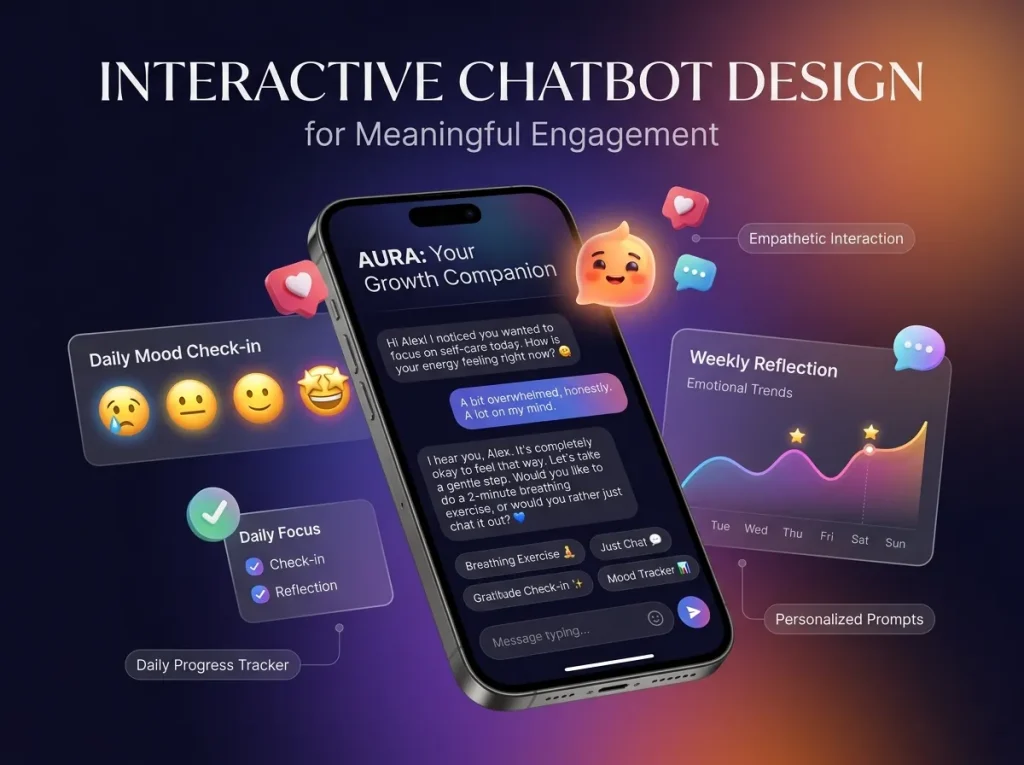
Interactive Chatbot Design combines conversational responses with useful actions that help users make progress. Rather than relying entirely on text, an interactive chatbot can offer product cards, selectable options, quick replies, forms, appointment slots, or links to relevant resources.
These elements are valuable when users need to compare alternatives or provide structured information. For example, a travel service chatbot could present available booking options, while a retail chatbot might display product recommendations with prices and relevant details.
Interactive elements should simplify decisions rather than create additional complexity. A menu with three relevant choices may help a user move forward, while a menu containing fifteen unrelated options can increase confusion.
The design should also preserve flexibility. Suggested replies are helpful for common requests, but users should be able to enter a different question when their needs do not match the available options.
Feedback is another important part of interaction. When a user submits information or selects an option, the chatbot should acknowledge the action and explain what happens next. If an operation takes time, a suitable progress message can prevent uncertainty.
For businesses, meaningful interactions can make chatbots more useful across customer support, product discovery, and marketing. Integrating chatbot technology to automate customer interactions can help businesses streamline routine tasks and deliver more consistent assistance. The focus should remain on helping users achieve their goals rather than encouraging unnecessary clicks or extending conversations without a clear purpose.
Natural Language Interaction Design
Natural Language Interaction Design helps chatbots understand and respond to the different ways people express their needs. Users rarely communicate in perfectly structured commands. They may use informal language, abbreviations, incomplete sentences, spelling mistakes, or several questions within the same message.
A well-designed chatbot should recognize common variations in wording and identify the user’s underlying intent whenever its technology allows. For instance, questions such as “Where’s my package?” and “Can I check my delivery?” may express the same basic request.
Context also matters. If a user has already selected a product or provided an order number, the chatbot should use that information when relevant rather than starting the conversation again.
However, natural language systems can misunderstand ambiguous requests. The interaction design should therefore include ways to confirm important details and ask for clarification when confidence is insufficient.
For example, if a customer asks to cancel an order but the system identifies multiple recent purchases, it should confirm which order the customer means before taking action.
The chatbot should also communicate uncertainty appropriately. Providing a clear explanation or offering human assistance is preferable to inventing an answer.
When natural language understanding is combined with sensible clarification and recovery options, conversations become more flexible while remaining reliable and predictable.
Chatbot Dialogue Patterns That Make Conversations Clearer
Chatbot Dialogue Patterns are reusable approaches for handling common conversational situations. They help designers maintain consistency while ensuring that the chatbot responds appropriately to different user needs.
A greeting pattern introduces the chatbot and explains how it can help. A clarification pattern requests missing information when a question is ambiguous. A confirmation pattern verifies important details before a consequential action, such as submitting a request or changing an account setting.
Error recovery is another essential pattern. When the chatbot does not understand a message, it should acknowledge the difficulty and offer useful alternatives. Repeating “I don’t understand” without changing the response provides little value.
A handoff pattern explains when a human representative is needed and how the user can reach one. This is especially important for complex complaints, sensitive account issues, or requests that require judgment beyond the chatbot’s capabilities.
Closing patterns should also be natural. When a task is complete, the chatbot can summarize the outcome and ask whether the user needs anything else without repeatedly prompting them to continue.
Consistent dialogue patterns make chatbot behavior easier to predict. They also help design teams maintain a recognizable tone across different conversation flows and reduce the likelihood of contradictory or confusing responses.
User-Centered Chatbot Design and Personalization
User-Centered Chatbot Design begins with understanding the people who will use the system. Different audiences have different expectations, levels of familiarity, accessibility requirements, and reasons for starting a conversation.
A chatbot for technical support may need to explain complex procedures in manageable steps, while a chatbot for product discovery may prioritize concise descriptions and comparisons. The design should reflect the task rather than apply the same conversational approach to every situation.
Research can reveal common user questions, points of confusion, and tasks that are difficult to complete through existing channels. These findings help designers prioritize the most valuable chatbot capabilities.
Chatbot Response Personalization can further improve relevance by adapting responses to the user’s context. Depending on the available information and permissions, a chatbot might recognize an existing customer’s account status, refer to a previously selected product, or provide information relevant to a stated preference. Integrating chatbot technology to automate customer interactions can help businesses handle routine inquiries more efficiently while delivering responses that better match individual needs.
Personalization should be transparent and proportionate. Businesses should collect only the information necessary for the intended purpose, handle it securely, and respect applicable privacy requirements. Users should not feel that the chatbot knows personal details without a clear reason.
The system should also avoid making unsupported assumptions. If a customer’s preferences are unknown, asking a simple question is often more effective than guessing.
When personalization is based on relevant context rather than excessive data collection, chatbot interactions can feel more useful while preserving user trust.
Chatbot Response Personalization and Consistent Communication
Personalized responses work best when they remain accurate, appropriate, and consistent with the brand’s communication style. A chatbot should adapt its wording to the situation without changing important facts or making promises the business cannot fulfill.
For example, a customer asking about a delayed delivery needs a direct explanation of the available information and the next steps. A prospective customer exploring a product may benefit from a comparison of features or a recommendation based on stated requirements.
The chatbot should distinguish between verified information and general suggestions. If a delivery estimate is unavailable, it should say so rather than provide a specific date without evidence.
Response length also matters. Simple questions generally benefit from short answers, while complex issues may require more explanation or a sequence of manageable steps.
Personalization should not make the conversation unnecessarily familiar or repetitive. Using a customer’s name in every response, for example, can feel unnatural. Relevant context is more valuable than superficial personalization.
Businesses can strengthen consistency by maintaining approved information sources, defining tone guidelines, and reviewing common response patterns. These practices help ensure that personalization improves the conversation without compromising accuracy or clarity.
Chatbot Usability Optimization Through Testing and Analysis
Chatbot Usability Optimization involves identifying interaction problems and improving the design based on actual user behavior. Even a carefully planned chatbot may contain confusing instructions, incomplete conversation paths, or responses that fail to address common questions.
Usability testing allows people to complete realistic tasks while designers observe where they hesitate, make mistakes, or abandon the conversation. Testing should include common requests as well as less predictable situations, such as incomplete answers, unexpected questions, and requests that require human assistance.
Performance data can provide further insight. Businesses may examine task completion rates, conversation abandonment, fallback frequency, user satisfaction, and the number of conversations that require escalation. The most useful measures depend on the chatbot’s purpose.
For a customer support chatbot, successful resolution and reduced unnecessary transfers may be important. For a marketing chatbot, qualified inquiries and relevant engagement may provide more meaningful evidence of value.
Reviewing Chatbot Response Analysis can help businesses understand how response accuracy, relevance, and quality contribute to the overall interaction. These findings can reveal whether problems originate in the chatbot’s underlying information, its conversational design, or the logic connecting different steps.
Improvements should be tested rather than assumed to work. Adjusting a confusing prompt, simplifying a menu, or adding a clarification step may improve task completion, but the results should be measured to confirm the effect.
Continuous evaluation keeps the chatbot aligned with changing user needs and helps prevent small design problems from becoming persistent sources of frustration.
Applying Chatbot Interaction Design to Marketing

Chatbot Interaction Design can support marketing by helping visitors discover relevant information, understand product benefits, and identify suitable next steps. A marketing chatbot might answer questions about services, guide visitors toward useful resources, or collect inquiry details when someone expresses interest.
For example, a visitor exploring a software product could ask about features, pricing, or compatibility. The chatbot can provide relevant information and direct the visitor to a product page or sales representative when more detailed assistance is needed.
The interaction should match the visitor’s intent. Someone looking for a quick answer should not be forced to complete a lengthy lead form, while someone requesting a consultation may benefit from a simple process for sharing contact details and preferred meeting times.
A well-designed Chatbot for Marketing can connect these conversations with broader marketing activities, helping businesses deliver timely information and guide prospects toward relevant opportunities.
Specialized applications may require additional design considerations. For example, Chatbots in NFT Marketing can help users explore project information, understand participation steps, or find answers to common questions. In such environments, clear explanations and careful handling of financial or security-related claims are especially important.
Across marketing applications, the priority should remain usefulness and transparency. A chatbot should make information easier to access, not pressure users into actions they do not understand.
Conclusion
Chatbot Interaction Design plays a central role in creating conversational experiences that are useful, accessible, and easy to navigate. By combining intuitive interfaces, logical conversation flows, natural language understanding, meaningful dialogue patterns, and appropriate personalization, businesses can help users complete tasks with less confusion.
Effective design also recognizes that chatbots have limitations. Clear error recovery, accurate responses, privacy-conscious personalization, and accessible human support are essential parts of a reliable experience.
Regular usability testing and performance analysis help businesses identify weaknesses and improve interactions over time. When chatbot design is guided by real user needs rather than automation alone, it can strengthen customer support, improve marketing engagement, and create more valuable digital experiences.
Frequently Asked Questions About Chatbot Interaction Design
1. What is Chatbot Interaction Design?
Chatbot Interaction Design is the process of planning how users communicate with a chatbot and how the system responds. It includes conversation flows, interface elements, dialogue patterns, error handling, and personalization to help users complete tasks effectively.
2. Why is conversational UI design important?
Conversational UI design helps users understand how to start a conversation, enter information, select options, and interpret responses. A clear interface reduces confusion, improves accessibility, and makes chatbot interactions easier to navigate across devices.
3. How can businesses improve chatbot user experience?
Businesses can improve chatbot user experience by providing accurate answers, simplifying conversation flows, using clear language, remembering relevant context, and offering human assistance when needed. Usability testing and feedback help identify further improvements.
4. What makes an effective chatbot conversation flow?
An effective conversation flow has a clear objective, logical steps, relevant questions, and useful responses. It also accounts for unexpected input, clarification, user corrections, and situations in which the chatbot cannot complete the requested task.
5. What is natural language interaction design?
Natural language interaction design focuses on helping users communicate with chatbots in ordinary language. It considers different phrasings, informal expressions, context, ambiguity, and clarification so the chatbot can respond appropriately to user requests.
6. How does personalization improve chatbot interactions?
Personalization allows a chatbot to use relevant context, such as a selected product or an existing support request, to provide more useful responses. It should rely on appropriate information, respect privacy, and avoid unsupported assumptions about users.
7. Which dialogue patterns should a chatbot include?
Common dialogue patterns include greetings, clarification questions, confirmations, error recovery, task completion, and human handoffs. These patterns make interactions more predictable and help users understand what to do when a conversation changes direction.
8. How can chatbot usability be measured?
Chatbot usability can be evaluated through task completion, abandonment rates, fallback frequency, user satisfaction, response accuracy, and escalation rates. The most relevant measures depend on the chatbot’s purpose and the tasks it is designed to support.
9. How does Chatbot Interaction Design support marketing?
It helps visitors find product information, explore services, receive relevant recommendations, and connect with sales teams. By matching conversations to user intent, marketing chatbots can make information easier to access and support more meaningful engagement.
10. How often should chatbot interactions be reviewed?
Chatbot interactions should be reviewed regularly and whenever important products, services, policies, or user needs change. Ongoing analysis can reveal recurring misunderstandings, outdated responses, and opportunities to simplify conversation flows.