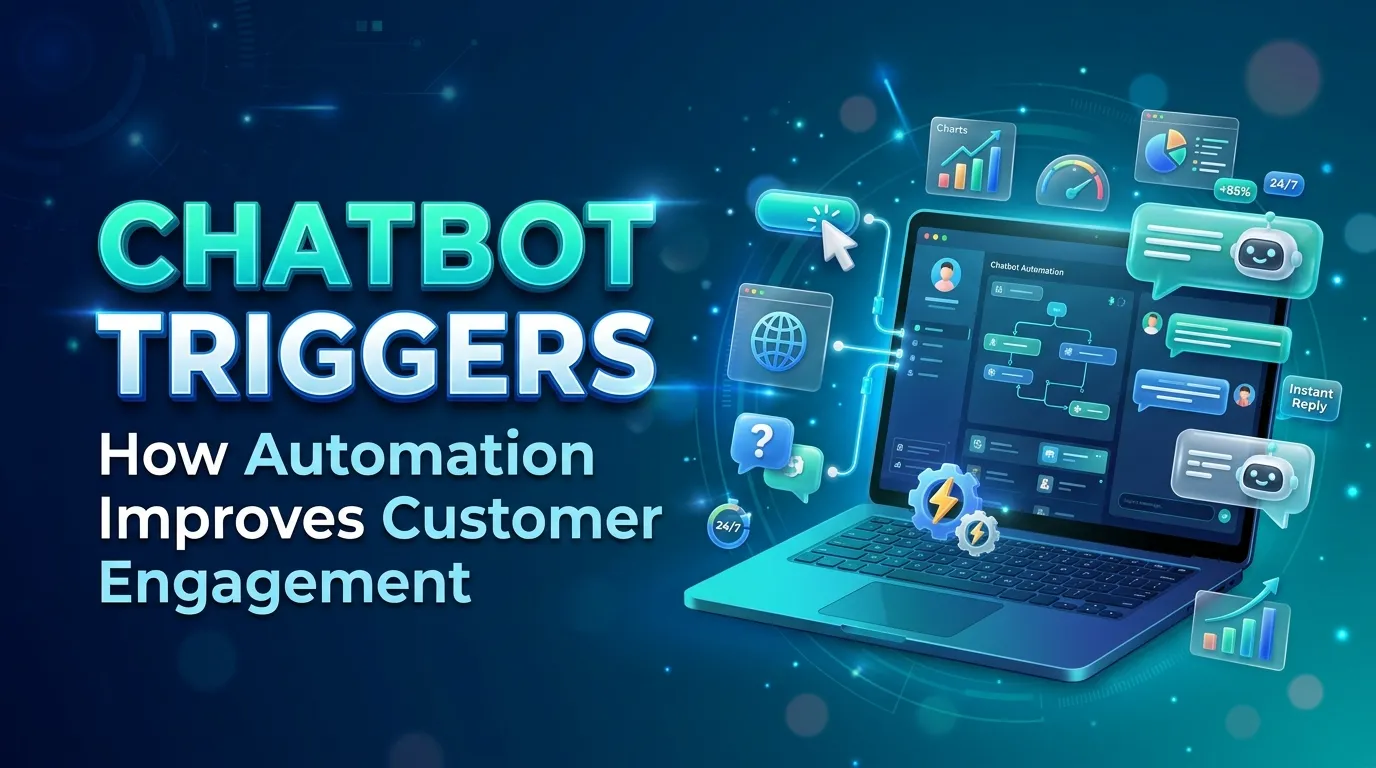
Chatbot triggers activate automated conversations in response to website activity, user behavior, customer requests, and business events. Website triggers, behavior-based rules, real-time events, and workflow automation help businesses deliver relevant messages, support lead generation, and streamline customer service. By refining trigger conditions, controlling message frequency, and measuring engagement, businesses can create more useful chatbot experiences while reducing unnecessary interruptions.
Chatbots have become an important part of digital communication, helping businesses answer questions, guide website visitors, and provide support without requiring a human agent for every interaction. However, a chatbot’s effectiveness depends on more than the quality of its responses. It also depends on knowing when to start a conversation, what message to display, and which user action should activate a response. This is where chatbot triggers become valuable.
Chatbot triggers are predefined events, behaviors, or conditions that activate a chatbot interaction. They allow businesses to respond when a visitor opens a webpage, clicks a button, spends time exploring a product, or requests assistance. Instead of waiting for every customer to initiate a conversation, businesses can use relevant triggers to make support and information more accessible.
When implemented thoughtfully, chatbot triggers can improve customer engagement, reduce unnecessary waiting, and help visitors find relevant information at the right moment. They can also support lead generation, product discovery, appointment scheduling, and customer service.
However, poorly configured triggers can interrupt browsing, create repetitive messages, or frustrate visitors. An effective system balances automation with user intent, ensuring that chatbot interactions feel helpful rather than intrusive.
Understanding how chatbot triggers work, which events activate them, and how businesses can optimize their conditions helps organizations create more useful and personalized conversational experiences.
Understanding Chatbot Triggers and Their Role in Automation
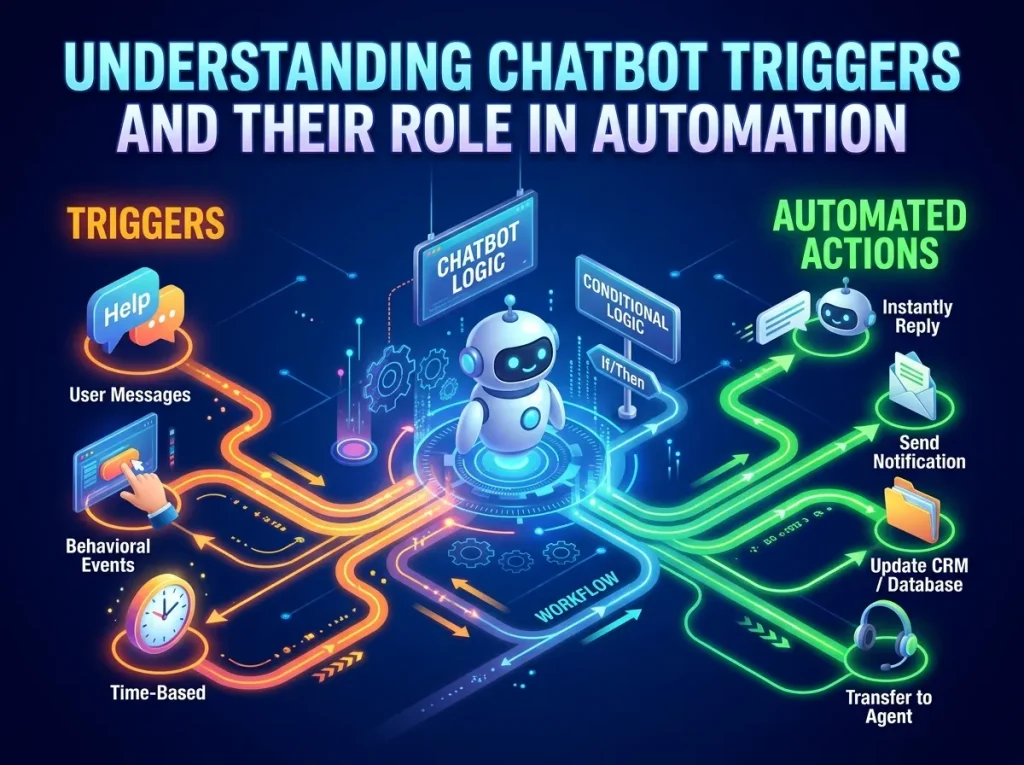
Chatbot triggers are the rules or signals that determine when a chatbot should initiate or continue an interaction. They connect user activity, website events, and business processes with automated conversational responses.
For example, a chatbot may appear when a visitor opens a pricing page, ask whether the visitor needs clarification about a product, or offer assistance after a customer clicks a support button. In each situation, a defined condition determines when the chatbot becomes active.
These triggers are useful because customers do not always communicate their needs directly. Their interactions with a website or application can indicate that they are searching for information, experiencing difficulty, or considering a purchase. A chatbot can respond to these signals when the system has enough relevant information to do so appropriately.
Chatbot triggers also help businesses maintain consistency across digital channels. A support chatbot can respond to a common question, while a sales chatbot can direct visitors toward relevant product information. In both cases, the trigger connects a particular situation with a suitable response.
The objective is not to start as many conversations as possible. It is to initiate interactions that provide genuine value. When triggers reflect the visitor’s needs and context, chatbots can become a natural extension of the customer experience.
Chatbot Trigger Events and Automated Responses
Chatbot trigger events are the actions or occurrences that activate a conversation. These events may come from website activity, user interactions, application events, or information received from connected business systems.
A common trigger event is a page visit. When someone opens a product page, the chatbot may offer product details or help answer frequently asked questions. A visitor arriving at a contact page might receive options for speaking with support or submitting an inquiry.
Other events include button clicks, form submissions, account registration, order updates, and requests for assistance. The appropriate response depends on the event and the purpose of the chatbot.
Automated chatbot triggers connect these events to predefined workflows. For example, submitting a support form might trigger a confirmation message, create a support ticket, and provide information about the next steps. A completed purchase might activate an order confirmation or direct the customer toward relevant post-purchase resources.
The value of automation comes from reducing unnecessary manual work while maintaining timely communication. Businesses can respond to routine events consistently without requiring employees to monitor every interaction.
However, automated responses need appropriate boundaries. A chatbot should not send a promotional message simply because someone visited a page if that interaction does not justify the interruption. Trigger events should be selected according to their relevance, the customer’s expectations, and the business objective.
Website Chatbot Triggers and Visitor Behavior
Website chatbot triggers help businesses respond to what visitors are doing while browsing their websites. These triggers can make assistance available when people are exploring products, comparing services, reviewing pricing, or searching for answers.
Time spent on a page is one possible trigger condition. If a visitor remains on a complex product page for a reasonable period, a chatbot might offer clarification about product features. Similarly, repeated visits to a pricing page could indicate that the visitor is researching purchasing options, although the behavior alone does not prove buying intent.
Scroll depth can provide another signal. A visitor who reaches a particular section of a long article may be offered a related resource or an opportunity to explore a connected topic. Exit-intent technology may also detect certain browser or pointer behaviors and present assistance before a visitor leaves, although its reliability varies across devices and browsing environments.
These interactions should remain relevant to the page being viewed. A visitor reading a technical article may benefit from a detailed explanation, while someone exploring a service page may prefer information about pricing or implementation.
Businesses should also account for repeat visitors and previous interactions. Showing the same introductory message on every page can create unnecessary repetition. Appropriate session rules and conversation history can help the chatbot recognize when a message has already been displayed.
Website chatbot triggers work best when they respond to meaningful behavior rather than treating every movement or page visit as a reason to interrupt the visitor.
Chatbot Trigger Messages and Customer Experience
Chatbot trigger messages are the opening messages displayed when a trigger condition is met. Their wording plays an important role in determining whether visitors choose to interact or ignore the chatbot.
An effective trigger message is clear, relevant, and easy to understand. It explains the type of assistance available without demanding unnecessary information or making assumptions about the visitor.
For example, a chatbot on a pricing page might offer to explain differences between service plans. A chatbot on a help page might ask whether the visitor needs assistance finding a particular answer. These messages connect the conversation to the visitor’s immediate context.
Timing also matters. A message that appears immediately after a visitor opens a page may interrupt the experience before the visitor has had time to explore. Waiting until a relevant interaction occurs can make the offer of assistance feel more natural.
Businesses should consider message frequency as well. Visitors who dismiss a chatbot prompt should not encounter the same message repeatedly during a single session without a clear reason. Frequency limits, dismissal settings, and sensible cooldown periods help prevent unnecessary interruptions.
The language should also match the brand’s communication style. A professional services website may benefit from straightforward wording, while a consumer application may use a more conversational tone. Regardless of style, the message should communicate value and make it easy for the user to choose whether to continue.
When trigger messages are carefully designed, they encourage engagement without placing pressure on visitors.
Chatbot Activation Rules and Trigger Conditions
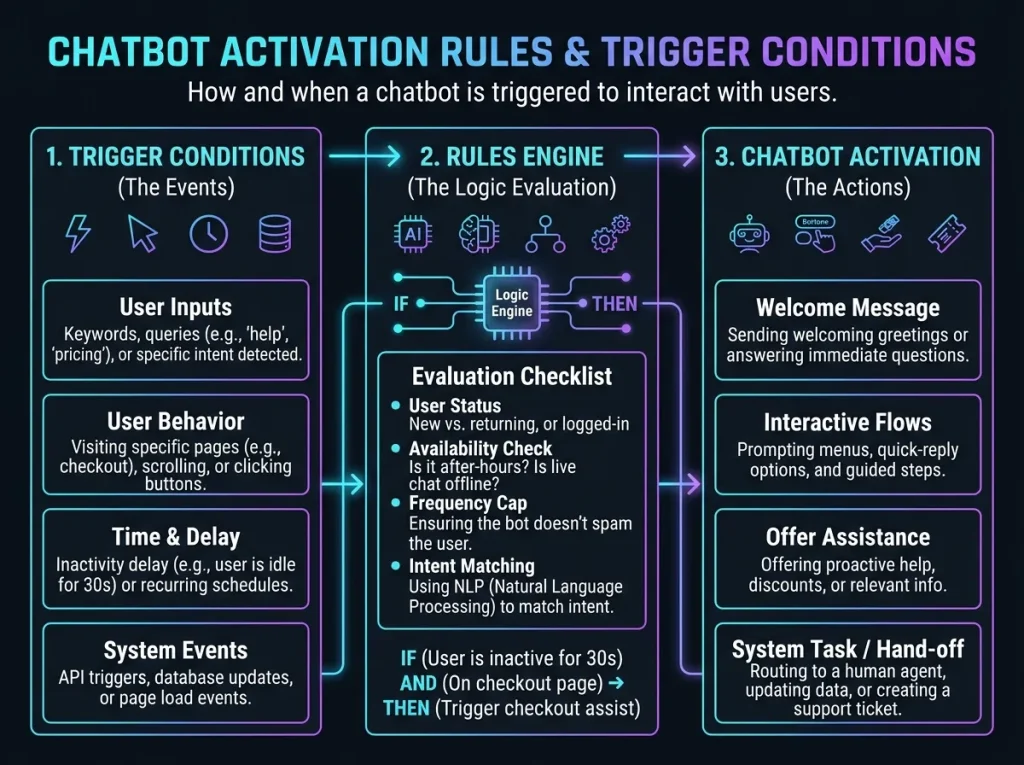
Chatbot activation rules define the circumstances under which a chatbot is allowed to start an interaction. These rules can combine multiple conditions, allowing businesses to create more precise experiences than a simple page-view trigger.
A chatbot might activate only when a visitor opens a specific page, remains there for a defined period, and has not already dismissed the same prompt. Another chatbot may activate when a customer clicks a help button, regardless of how long they have been on the website.
Trigger conditions can include page location, device type, session status, time of day, referral source, previous conversation activity, or information stored in a connected customer system. The available conditions depend on the chatbot platform and the data the business is authorized to use.
Combining conditions can reduce irrelevant interactions. For example, a pricing-related message may be limited to visitors viewing pricing information rather than appearing across the entire website. A support prompt might be displayed only when a customer visits a troubleshooting page.
Businesses should also consider priority rules when several triggers become eligible at once. If a visitor encounters a technical error while a promotional trigger is also available, assistance with the technical issue should take precedence over a sales message.
Well-defined activation rules make chatbot behavior more predictable. They also simplify testing because teams can identify which conditions should produce a particular response and investigate situations where the chatbot activates unexpectedly.
Behavior-Based Chatbot Triggers and Customer Profiling
Behavior-based chatbot triggers use observed interactions to determine when a conversation may be useful. Instead of relying only on a single page visit, these triggers consider patterns such as repeated searches, product comparisons, previous questions, or engagement with specific resources.
For example, a visitor who repeatedly explores information about one product category may benefit from a chatbot that offers relevant specifications or purchasing information. A returning customer who opens a troubleshooting section may receive a shortcut to support resources.
These triggers can become more relevant when combined with appropriate customer information. Chatbot Customer Profiling explores how user information and interaction patterns can support more personalized conversations.
However, personalization requires care. A website visit or repeated click should not automatically be treated as proof of a person’s interests, identity, or purchasing intentions. Businesses should use relevant signals conservatively and avoid making intrusive assumptions.
Data quality is also important. Outdated preferences, incomplete customer records, and activity shared across multiple users can lead to inappropriate messages. Where customer profiles are used, organizations should maintain suitable access controls, transparency, and privacy practices.
Behavior-based triggers are most effective when they help visitors find useful information without making the interaction feel overly personal or intrusive. The goal is to respond to the context of the interaction, not to create unnecessary surveillance or pressure.
Chatbot Engagement Triggers and Lead Generation
Chatbot engagement triggers are designed to encourage meaningful interaction between visitors and a business. They can support lead generation, product discovery, customer education, and the transition from browsing to a more direct conversation.
A chatbot may offer a relevant resource after a visitor reads an educational article or provide an option to request a consultation on a service page. For businesses with complex offerings, a conversational prompt can help visitors identify which information they need before speaking with a sales representative.
The quality of the interaction matters more than the number of conversations initiated. A chatbot that opens frequently but receives few useful responses may be interrupting visitors rather than helping them. By contrast, a well-timed prompt can guide an interested visitor toward a useful next step.
Businesses should also make information requests proportionate to the interaction. Asking for a name and email address may be reasonable when someone requests a consultation, but demanding extensive personal details before answering a simple question can discourage engagement.
Engagement triggers should also accommodate people who are not ready to become leads. Visitors should be able to continue browsing, access available information, or dismiss the prompt without being pressured into providing contact details.
This approach supports a more balanced customer journey. Chatbots can make the next step easier while respecting the visitor’s choice about whether to continue the conversation.
Chatbot Workflow Triggers and Business Operations
Chatbot workflow triggers connect conversations with other business processes. They allow a chatbot interaction to initiate an action in a customer relationship management system, support platform, scheduling application, or another connected service.
For example, when a customer requests human assistance, the chatbot may collect the relevant details, categorize the request, and create a support ticket. When a visitor books a consultation, the chatbot may initiate a confirmation workflow or update the appropriate customer record.
Workflow triggers can also support internal notifications. A request that meets defined criteria might alert a sales representative, while a technical issue may be routed to a support team. This reduces the need for employees to transfer information manually between systems.
For customer service teams, this type of automation can improve consistency and reduce administrative workloads. It also creates a clearer connection between the conversation and the action required to resolve the customer’s request.
These benefits depend on reliable integrations and appropriate exception handling. If a connected system is unavailable or a required field is missing, the chatbot should communicate the problem clearly and provide a suitable alternative where possible.
Businesses should also distinguish between automated actions that can be completed safely and requests that require human review. Complex complaints, sensitive account changes, and unusual cases may need additional verification or direct assistance.
Workflow triggers are most useful when they connect conversations to meaningful outcomes rather than simply generating more automated messages.
Real-Time Chatbot Triggers and Responsive Support
Real-time chatbot triggers activate responses as relevant events occur. They can help businesses provide timely information during website sessions, application interactions, transactions, and support conversations.
A real-time trigger might respond when a visitor clicks a help option, submits a question, encounters a defined error, or requests information about an order. Because the response follows the event closely, the customer can receive assistance while the issue is still relevant.
Real-time behavior can be particularly useful in applications where users need immediate clarification. For example, AI Chatbots for Health Apps discusses the role conversational systems can play in mobile health experiences. In such settings, triggers must be designed carefully, with clear limitations, appropriate privacy safeguards, and escalation to qualified professionals when necessary.
Real-time interactions can also support specialized digital environments. In NFT communities, for instance, Chatbots in NFT Marketing explores how chatbots can support engagement and communication. Relevant triggers may help users find community information, understand platform features, or access answers to common questions.
However, real-time responses are only useful when they are accurate and appropriate. Businesses should avoid promising instant resolution when the chatbot cannot access the necessary information or when a request requires human judgment.
Reliable integrations, sensible response rules, and clear escalation options help ensure that real-time chatbot triggers improve support instead of creating new sources of confusion.
Measuring and Optimizing Chatbot Trigger Performance
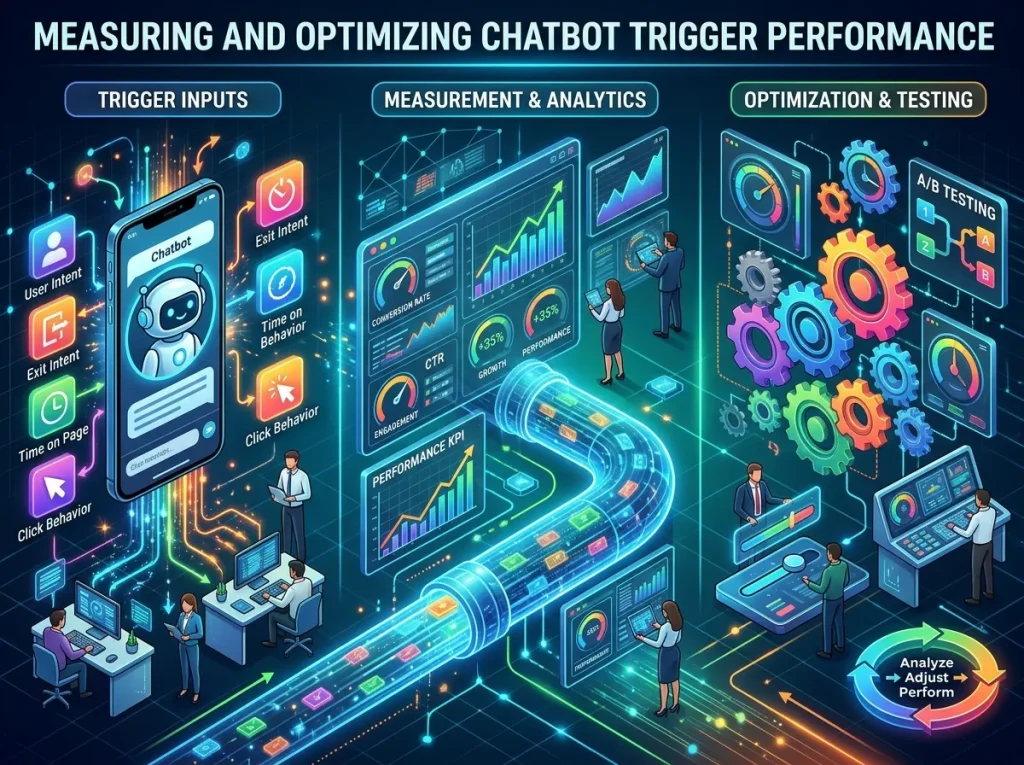
Chatbot trigger optimization involves evaluating whether automated prompts activate at appropriate moments and produce useful outcomes. The purpose is to improve the quality of interactions rather than simply increase the number of chatbot openings.
Businesses can examine trigger impressions, interaction rates, conversation completion, user dismissals, lead submissions, support resolutions, and other metrics relevant to the chatbot’s purpose. Comparing these measurements across pages or trigger conditions can reveal which interactions provide value.
For example, a chatbot prompt on a pricing page may generate more qualified inquiries than the same message on a general blog page. A support trigger may be successful when it helps customers find answers without creating additional tickets. The correct success measure depends on the intended outcome.
Testing different timing rules and message wording can also improve performance. A business may compare a delayed prompt with a click-activated prompt to understand which approach creates less disruption and more meaningful engagement.
Testing should account for the full customer experience. A high interaction rate does not necessarily indicate success if visitors abandon the page afterward or repeatedly dismiss the prompt. Teams should review both engagement and downstream outcomes.
Businesses should also check trigger accuracy, duplicate activation, accessibility, mobile behavior, and the effect of multiple triggers competing for attention.
Ongoing measurement allows organizations to refine their rules as user behavior changes. With regular evaluation, chatbot triggers can become more precise, useful, and aligned with business objectives.
Conclusion
Chatbot triggers determine when automated conversations begin and how chatbots respond to customer actions, website activity, and business events. From simple page-based prompts to behavior-based personalization and real-time workflow automation, these triggers help businesses deliver information and support at relevant moments. By combining well-designed triggers with effective chatbot technology that helps automate customer interactions, businesses can provide timely assistance and create smoother customer experiences.
Their effectiveness depends on thoughtful activation rules, clear messages, reliable integrations, and an understanding of customer intent. When triggers are poorly configured, they can interrupt visitors and create unnecessary friction. When carefully designed, they make assistance easier to access and connect conversations with meaningful outcomes.
Businesses should regularly evaluate trigger performance, protect customer privacy, and provide clear options for human assistance when automation is insufficient. By balancing timely responses with customer choice, organizations can build chatbot experiences that improve engagement, support service efficiency, and contribute to stronger digital relationships.
Frequently Asked Questions (FAQs)
1. What are chatbot triggers?
Chatbot triggers are predefined events or conditions that activate a chatbot conversation. They may include page visits, button clicks, form submissions, customer questions, or specific actions within an application.
2. How do automated chatbot triggers work?
Automated chatbot triggers monitor configured events or conditions. When the required criteria are met, the chatbot starts a conversation, displays a message, or initiates a connected workflow.
3. What are website chatbot triggers?
Website chatbot triggers respond to visitor activity, such as opening a particular page, clicking a help button, spending time on a page, or interacting with a website feature.
4. What is the difference between behavior-based and event-based chatbot triggers?
Event-based triggers respond to a specific occurrence, such as a button click or form submission. Behavior-based triggers consider user actions or patterns, such as repeated visits or engagement with particular content.
5. Why are chatbot activation rules important?
Activation rules determine when a chatbot should appear and which conditions must be met. Well-designed rules reduce irrelevant messages, prevent repeated prompts, and make conversations more useful.
6. How do chatbot triggers improve customer engagement?
Chatbot triggers can offer assistance when visitors need information, help customers navigate a website, answer common questions, and guide interested users toward relevant resources or services.
7. Can chatbot triggers help generate leads?
Yes. Chatbot triggers can offer relevant resources, explain services, answer product questions, or provide consultation options when visitors show interest. Their effectiveness depends on timing, relevance, and the quality of the conversation.
8. What are real-time chatbot triggers?
Real-time chatbot triggers activate responses as relevant events occur. They can support immediate answers to customer questions, help requests, transaction updates, and application interactions.
9. How can businesses measure chatbot trigger performance?
Businesses can evaluate interaction rates, dismissals, completed conversations, qualified leads, support outcomes, and conversions. The most useful metrics depend on the purpose of each trigger.
10. How can businesses prevent chatbot triggers from annoying visitors?
Businesses can use relevant activation conditions, delay nonessential prompts, limit repeated messages, respect dismissals, prioritize support requests, and give visitors control over whether to continue the conversation.